The ticket looked like a plain chore: pull last month's invoices from a supplier portal, reconcile them against the ledger, and file the result. Read closely, it was several jobs stitched together, from a website login to a script that crunched the numbers to a save dialog the portal opened outside the page. The planning meeting stalled on where the agent should actually run.
Each part of that ticket points to a different environment, and the wrong pick costs speed or money. Solari offers three surfaces from one account and one API: Cloud Browsers for work inside web pages, AI Sandboxes for code with no screen, and Computer Desktops for jobs that need a real screen. Start in a browser when the job lives on the web, use a sandbox when it lives in code and files, and open a desktop only when it leaves the page. This guide walks through the signals for each, how they combine and what they cost.
How to Tell Which Surface a Job Needs
The quickest test is to ask what the agent has to touch, because each surface is built around a different target. The figure below sets the three side by side.
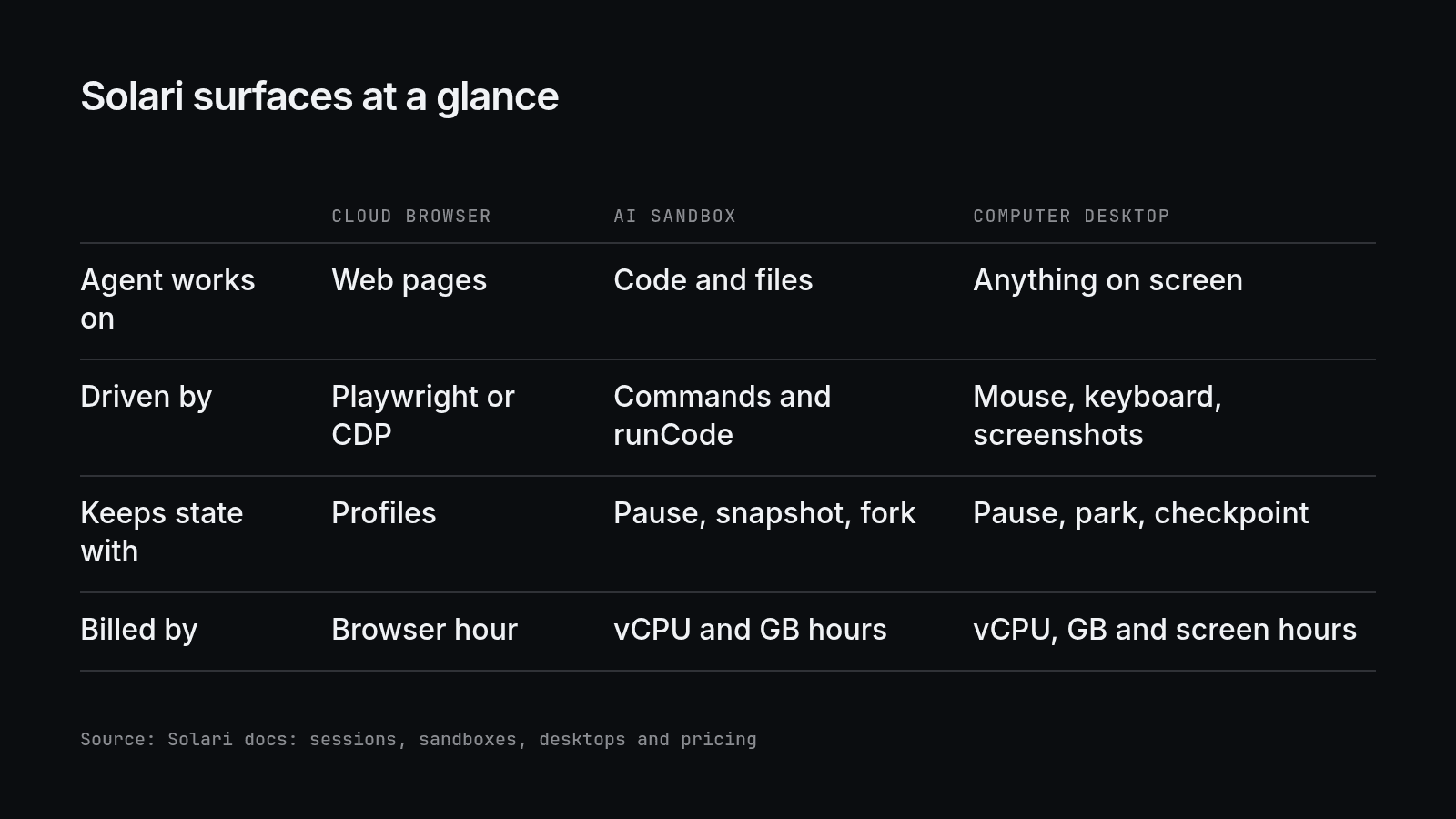
The first row usually settles the choice, and most jobs start on a web page, so the browser comes first.
When a Cloud Browser Is Enough
A cloud browser covers any job that happens inside web pages. A Solari session is a real browser driven with the standard Playwright API, and a headless browser like this reads the page through the Document Object Model, so the agent finds a button by its selector, not its pixels.
Every session option is opt-in, and the default is a fast headless browser with no profile, recording, proxy or stealth. Profiles keep a login between runs: a profile saves the cookies and site data, and a session created with its profileId starts signed in. Recording adds a replay of the run, but it captures input values by default, so a session that types a password should stay unrecorded.
The browser stops being enough once the agent needs to run its own code.
When the Job Belongs in a Sandbox
Code is the next boundary, and a sandbox exists so that code an agent wrote runs apart from the systems around it. A Solari sandbox is a machine for running code with no screen: the agent runs commands, keeps Python state between runCode calls, works with files and commits with Git.
Isolation is set at create time. The default, "dedicated", gives each sandbox a microVM of its own, and "hardened" is the same machine with all outbound network blocked, which suits code nobody has reviewed. Pause saves memory and processes and resume brings the sandbox back exactly as it was, while a snapshot can later be reverted to or forked into a new sandbox.
A sandbox has no screen, though, and that is the line the last surface crosses.
When Only a Desktop Will Do
Some jobs leave the page and the terminal behind. A Solari Computer Desktop is a full Linux computer with a graphical screen, driven with mouse, keyboard and screenshots, and it starts in about a second with Google Chrome and the XFCE terminal installed.
The signs show up in the task: a native save dialog, a desktop application with no API, or a canvas widget that answers only to a real pointer. A teammate can watch or take over through the live view, whose stream URL is a credential to keep out of logs.
Seeing costs time, because every step waits for a model to read an image, so the desktop is the last resort. Pause a VM to keep its work, since a VM that powers itself off is deleted with its disk. Most real jobs, like the invoice ticket, end up on more than one surface.
Combining Surfaces in One Job
Splitting a job is normal, and the shared account keeps the split simple. For the invoice ticket, a browser session with a saved profile signs into the portal and downloads the files, a sandbox reconciles them against the ledger, and a desktop runs only if the save dialog cannot be avoided.
A sandbox can publish a port with previewUrl(port), a signed URL a browser session opens like any page, which is the core of pairing a sandbox with a browser. Each surface also bills on its own meter, which shapes what the split costs.
What Each Surface Costs to Run
Each surface bills by the time it runs. On the Professional plan, Solari bills browsers at $0.07 per browser hour and sandboxes and VMs at $0.0245 per vCPU-hour and $0.0077 per GB-hour, with VMs adding $0.02 per hour for the live screen.
A browser bills only while its session is open, so close it in a finally block, and a paused VM stops counting against the plan's limit on running VMs. The Free plan includes $3 of monthly credits, and at a zero balance new sandboxes and desktops stop launching rather than running up an overage. That leaves a short rule.
Choosing the Right Setup
Pick the surface by what the agent touches. Keep web work in a cloud browser with a profile for logins, put code and files in a sandbox with hardened isolation when the code needs no network, and open a desktop only for a native dialog, a desktop application or a pointer-only widget. When a job crosses those lines, split it across surfaces on one Solari account.
Get Started With Solari
Start with the web half of the job: open a browser session, sign in and save the login as a profile. Solari is built to be the fastest and cheapest home for agent work, with browsers ready in 8 ms and sandboxes in 90 ms. Create a free Solari account and the Free plan's credits cover the first runs.
